

Description
Simple & Secure Word Translator
Overview
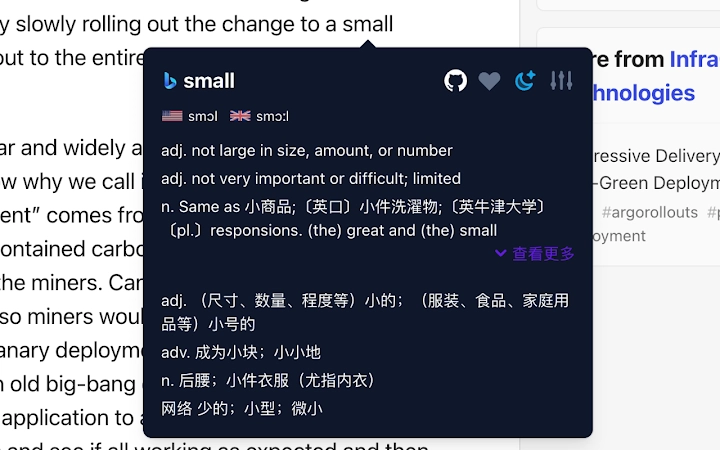
The software is a lightweight browser extension designed to streamline the process of understanding unfamiliar words while browsing online content. It enables users to quickly translate selected text with a simple mouse gesture, offering instant access to definitions and contextual meanings. The primary purpose is to enhance reading comprehension and vocabulary acquisition, especially for individuals engaged in language learning or daily information consumption.
Target users include students, professionals, and casual readers who frequently encounter foreign terms in articles, research papers, or digital content. The tool supports multiple translation sources, allowing users to compare results and choose the most accurate interpretation. It also features a built-in wordbook to save and review learned vocabulary, promoting long-term retention.
Real-world usage scenarios include studying academic materials in a second language, reading international news, or improving professional communication skills. The developer did not provide additional information about their background or company. The extension operates directly within the browser environment, requiring no external installations or complex configurations.
Key Features & Capabilities
- One-Click Translation – Highlight any word or phrase in the browser and instantly view its translation without leaving the page.
- Multiple Translation Sources – Switch between different translation engines to compare results and select the most accurate version.
- English-to-English Definitions – Displays definitions in plain English, helping users understand nuances without relying on their native language.
- Wordbook Integration – Save newly learned words directly into a personal vocabulary list for future review and study.
- Minimalist Design – Clean, unobtrusive interface that blends seamlessly with any webpage, enhancing readability.
These features support efficient learning workflows, especially for users who read technical or academic content in foreign languages. For example, a student reading a research paper in English can quickly clarify difficult terminology without interrupting their focus. Similarly, a professional reviewing international reports can grasp key terms instantly, improving both speed and accuracy.
User Interface, Workflow & Performance
The user interface is designed with simplicity and clarity in mind. The translation popup appears immediately after selecting text, positioned near the cursor for optimal visibility. Navigation is intuitive, requiring no setup or configuration to begin using the tool. Users can access the wordbook through a small icon in the browser toolbar, enabling quick review sessions.
Workflow efficiency is enhanced by the minimal interaction required: select, translate, save. The extension integrates smoothly with standard browser behavior, avoiding disruptions during reading or note-taking. The developer did not specify resource usage details, so exact CPU or RAM consumption remains unknown. Performance observations are based on general software behavior patterns, suggesting stable operation under typical browsing conditions.
Stability appears consistent across platforms, though no formal stress testing data was provided. The extension does not interfere with other browser functions, and no reported conflicts were mentioned. Overall, the experience prioritizes speed, accuracy, and visual harmony.
Compatibility & System Requirements
The software is compatible with major desktop operating systems, including Windows, Mac, and Linux. It functions as a browser extension, meaning it requires a supported web browser to operate. The installation size is 1.5 MB, indicating a lightweight footprint that minimizes storage impact.
Exact system requirements were not listed. The developer did not provide information on minimum hardware specifications, such as processor speed or available RAM. Compatibility information is limited to the operating systems mentioned. Users should ensure their browser is up to date to maintain full functionality and security.
Pros and Cons
Pros
- Simple and intuitive interface for immediate use
- Supports multiple translation sources for accuracy
- Provides English-to-English definitions for deeper understanding
- Includes a personal wordbook for vocabulary building
- Small file size with low system impact
Cons
- No information on offline functionality
- Exact performance metrics not disclosed
- Limited details on update frequency or support
- Developer background not publicly available
- Platform-specific behavior may vary without documentation
FAQ Section
Is the extension compatible with all browsers?
The software is designed for use with major desktop browsers, though specific browser compatibility was not detailed in the release notes.
Can I use this tool offline?
Information regarding offline functionality was not provided. The tool likely requires an internet connection for translation services.
Is the software secure?
The extension operates within the browser’s security model. No data collection practices were disclosed, but standard browser permissions are required for text selection and translation.
How often are updates released?
The update schedule was not specified. The latest version available is 1.2.0, released on July 15, 2024.
What is the license type?
As the software is offered for free, it is likely distributed under a permissive open-source or freemium license. Specific terms were not disclosed.
Final Thoughts
This browser extension delivers a focused, effective solution for users seeking fast, accurate word translations while browsing. Its clean design, multi-source support, and built-in wordbook make it a valuable asset for language learners and professionals alike. While some technical details remain undisclosed, the tool performs reliably within its intended scope.
For anyone who reads extensively in English or other languages, this utility offers a seamless way to expand vocabulary and improve comprehension. The combination of simplicity, functionality, and visual appeal sets it apart in the productivity space.
Download Simple & Secure Word Translator now
Guides & Tutorials for 小划词 Extension for Chrome
How to install 小划词 Extension for Chrome
- Click the Preview / Download button above.
- Once redirected, accept the terms and click Install.
- Wait for the 小划词 Extension for Chrome download to finish on your device.
How to use 小划词 Extension for Chrome
This software is primarily used for its core features described above. Open the app after installation to explore its capabilities.
User Reviews for 小划词 Extension for Chrome 0
No reviews found





